Threaded Comments
EPPlus supports threaded comments from version 5.3. With threaded comments users can add comments to a thread that belongs to a cell in a worksheet. The users can mention eachother in the comments and the entire thread can be resolved (closed/locked) and re-opened. EPPlus 5 supports all of these features. Threaded comments exists in several spreadsheet programs, however the EPPlus 5 implementation is designed to cover most of the functionality in Excel/Office 365.
For backward compatibility cells with a threaded comments also contains a "legacy comment", that replicates the content of the thread. This comment will be overwritten with new content when opened in a spreadsheet program that supports threaded comments.
ThreadedCommentPersons
When a user adds a threaded comment in Excel/Office 365 the user is added to the ThreadedCommentPersons collection in the workbook. With EPPlus 5 and up you can read/edit/delete these persons, see code below.
You can add a new person this way:
The collection of ThreadedCommentPerson is also available via the worksheet (this is editing the same underlying data as when you use the property on the worksheet), see code below.
The Persons collection exposes functions for an indexer (numeric index and id (string)) and properties/methods such as Count, Find, Remove.
IdentityProvider enum
This enum represent the for different sources that are supported:
NoProvider- The person is not represented in a catalog outside the workbookActiveDirectory- The person corresponds to an Active directory user. Person's userId should be an ActiveDirectory Security Identifier (SID).WindowsLiveId- The person corresponds to a Windows Live user. Person's userId should be a 64-bit signed decimal that uniquely identifies a user on Windows Live.Office365- The person corresponds to an Office 365 user. The Person's userId should be a string that uniquely identifies a user. It SHOULD be comprised of three individual values separated by a "::" delimiter.PeoplePicker- The person corresponds to a People Picker user. The Persons userId should be an email address provided by People Picker.
Read more about managing persons here: https://docs.microsoft.com/en-us/openspecs/office_standards/ms-xlsx/6274371e-7c5c-46e3-b661-cbeb4abfe968
Adding comments
The comment threads can be accessed either on worksheet level or directly via a cell.
using (var package = new ExcelPackage())
{
    var sheet = package.Workbook.Worksheets.Add("test");
    var person = sheet.ThreadedComments.Persons.Add("John Doe");
    var person2 = sheet.ThreadedComments.Persons.Add("Jane Doe");
    var thread = sheet.Cells["A1"].AddThreadedComment();
    var c1 = thread.AddComment(person2.Id, "Hello");
    // Mention Jane Doe (person2) in the comment.
    var c2 = thread.AddComment(person.Id, "Hello {0}, how are you?", person2);
}
Using package As New ExcelPackage()
    Dim sheet = package.Workbook.Worksheets.Add("test")
    Dim person = sheet.ThreadedComments.Persons.Add("John Doe")
    Dim person2 = sheet.ThreadedComments.Persons.Add("Jane Doe")
    Dim thread = sheet.Cells("A1").AddThreadedComment()
    Dim c1 = thread.AddComment(person2.Id, "Hello")
    ' Mention Jane Doe (person2) in the comment.
    Dim c2 = thread.AddComment(person.Id, "Hello {0}, how are you?", person2)
End Using
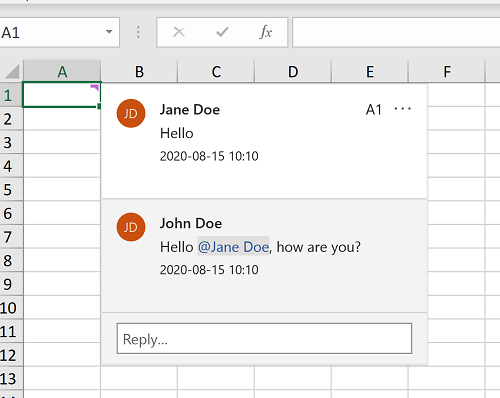
This code will result in this thread:
Mentions
You can mention one or more persons in a comment. Continuing with the code above, we can mention both John and Jane like this
As you can see, the way of inserting mentions works similar to the .NET string.Format method. You can mention a person more than once in a comment, but only the first occurance will be a "proper" mention.
The mentions in a comment can be read using the comments Mentions property.
Notifications
In Office 365, when a user inserts a mention in a comment an email is sent as a notification to the mentioned person. Please note that EPPlus doesn't send notifications. If you want to send notifications when you create a mention you need to use data from the Persons collection, connect to your IdentityProvider and retrieve the information needed to send a notification.
Edit a comment
The Text property of a comment is readonly. Use the EditText function to change the text of an existing comment. With the EditText function you can set a new text on the comment with or without mentions.
Resolve/Re-open a thread
You can resolve (lock the thread for new comments) and re-open a thread by using the ResolveThread and ReopenThread methods.