Icon Set example
Here is a Conditional Formatting example where we add a Three Icon Set rule. Let's start with how the result will look like:
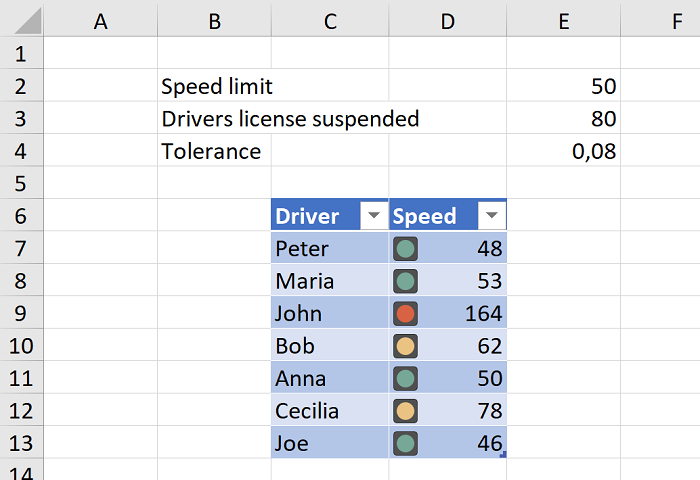
Here is how this rule will look like when edited in Excel:
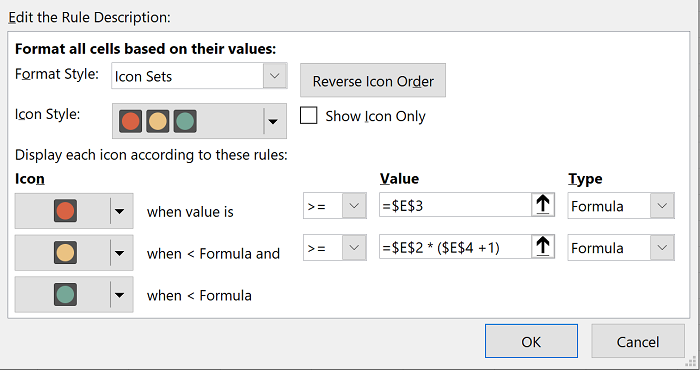
And here is the code to achieve it with EPPlus:
// Use traffic light icons
var cfRule = sheet.ConditionalFormatting.AddThreeIconSet(sheet.Cells["D7:D13"], eExcelconditionalFormatting3IconsSetType.TrafficLights2);
cfRule.Icon2.Type = eExcelConditionalFormattingValueObjectType.Formula;
cfRule.Icon2.Formula = "$E$2 * ($E$4 +1)";
cfRule.Icon3.Type = eExcelConditionalFormattingValueObjectType.Formula;
cfRule.Icon3.Formula = "$E$3";