Autofit columns
The ability to adjust column widths to fit the widest text of the column has been around in EPPlus for a long time, but it has been rewritten from EPPlus 6 and up. In previous versions this functionality, which requires measurements of text strings, has been relying on the System.Drawing library which is the graphics library that is included in .NET). From .NET 6 Microsoft has deprecated this library on non-Windows platforms which is the main reason for the new implementation.
Simple example
Here is a simple visualization of the autofit column functionality.
var sheet = package.Workbook.Worksheets["MySheet"];
// entire worksheet
sheet.Cells.AutofitColumns();
// a column
sheet.Columns[1].AutoFit();
// a specific range
sheet.Cells["A1:B3"].AutofitColumns();
// a table
tableRange = sheet.Cells[1, 1].LoadFromCollection(tableData2, true, TableStyles.Light1);
tableRange.AutoFitColumns();
Dim sheet = package.Workbook.Worksheets("MySheet")
' entire worksheet
sheet.Cells.AutofitColumns()
' a column
sheet.Columns(1).AutoFit()
' a specific range
sheet.Cells("A1:B3").AutofitColumns()
' a table
tableRange = sheet.Cells(1, 1).LoadFromCollection(tableData2, True, TableStyles.Light1)
tableRange.AutoFitColumns()
1. Before autofit columns
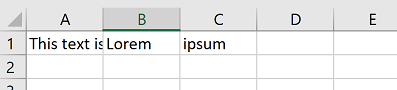
2. After autofit columns

Accuracy and Excel compatibility
In spreadsheet applications like Excel, you would autofit the column width by double-clicking the gridline between two column labels. Please note this is a client-side technology that might render different results on different computers. For this reason it is impossible to achieve a perfect column width that will appear the same on all types of clients, regardless if the System.Drawing classes are used or not.
EPPlus is aiming to make the column widths wide enough to fit everywhere, which means that the auto-fitted column widths can appear just a little bit too wide in some environments.
EPPlus 6+ implementation
The new implementation for text measurements in EPPlus does not rely on the underlying O/S. Instead it is built on approximations of the width of each character in a number of fonts in combination with scaling factors. Based on our own testing this gives similar results as the previous functionality based on System.Drawing. On Windows platforms with GDI support System.Drawing will still be used. For other platforms EPPlus will use its internal text measurer.
TextSettings
There is a new property in EPPlus 6 and up that you can use to configure the text measurements functionality. Here is how you access this property:
This property is of the class ExcelTextSettings and it has a few properties where some of them are of the type OfficeOpenXml.Interfaces.Drawing.Text.ITextMeasurer. The ITextMeasurer interface is from a new Nuget package that contains interfaces and abstract classes used in EPPlus, see https://www.nuget.org/packages/EPPlus.Interfaces/
Here is a list of the properties of ExcelTextSettings:
| Property | Data type | Default value | Description |
|---|---|---|---|
AutofitScaleFactor |
float |
1f | Can be used to adjust the results of AutofitColumns(). A value of 1.1f will make all measurements 10% wider, a value of 0.9f will make them 10% narrower. |
PrimaryTextMeasurer |
ITextMeasurer |
The primary text measurer, i.e. the ITextMeasurer that EPPlus will use first. For windows platforms with support for GDI this is per default using System.Drawing. For other platforms (Linux, Blazor, Windows Nanoserver, etc) the FallbackTextMeasurer will be used. |
|
FallbackTextMeasurer |
ITextMeasurer |
Will be used by EPPlus if the primary text measurer fails. This is per default EPPlus internal text measurer | |
DefaultTextMeasurer |
ITextMeasurer |
Will be used by EPPlus if both the PrimaryTextMeasurer and FallbackTextMeasurer fails. This is per default a text measurer that uses the new internal functionality in EPPlus 6 and Excels default font to measure the text. |
|
AutoFitRows |
int |
5000 | Can be used to set the max number of rows to measure. Set to 0 to check all rows. New from EPPlus 8.0 |
Use a custom ITextMeasurer
In some cases it might be useful to create a custom text measurer for EPPlus. One scenario could be that you are on a non-GDI platform and have a set of fonts that EPPlus doesn't provide accurate measurements for with its internal measurer. Here is an example using the SkiaSharp library (just a sample, provided "as-is").
1. Create the text measurer implementation
- Add a reference to the
EPPlus.InterfacesNuget package. - Add a reference to the SkiaSharp Nuget package.
- Create a class that implements the
OfficeOpenXml.Interfaces.Drawing.Text.ITextMeasurerinterface.
using OfficeOpenXml.Interfaces.Drawing.Text;
using SkiaSharp;

namespace AutofitSkiaTest
{
    internal class SkiaSharpTextMeasurer : ITextMeasurer
    {
        private SKFontStyle ToSkFontStyle(MeasurementFontStyles style)
        {
            switch (style)
            {
                case MeasurementFontStyles.Regular:
                    return SKFontStyle.Normal;
                case MeasurementFontStyles.Bold:
                    return SKFontStyle.Bold;
                case MeasurementFontStyles.Italic:
                    return SKFontStyle.Italic;
                case MeasurementFontStyles.Bold | MeasurementFontStyles.Italic:
                    return SKFontStyle.BoldItalic;
                default:
                    return SKFontStyle.Normal;
            }
        }

        public TextMeasurement MeasureText(string text, MeasurementFont font)
        {
            var skFontStyle = ToSkFontStyle(font.Style);
            var tf = SKTypeface.FromFamilyName(font.FontFamily, skFontStyle);
            using (var paint = new SKPaint())
            {
                paint.TextSize = font.Size;
                paint.Typeface = tf;
                var rect = SKRect.Empty;
                paint.MeasureText(text.AsSpan(), ref rect);
                // The scaling factors below are needed to translate the Skia measurements to Excel column widths.
                return new TextMeasurement(rect.Width / 0.7282505F + (0.444444444F * font.Size), rect.Height * (96F / 72F));
            }

        }

        public bool ValidForEnvironment()
        {
            // you can use this method to check if your text measurer
            // works in the current environment.
            return true;
        }
    }
}
Imports OfficeOpenXml.Interfaces.Drawing.Text
Imports SkiaSharp

Namespace AutofitSkiaTest
    Friend Class SkiaSharpTextMeasurer
        Implements ITextMeasurer

        Private Function ToSkFontStyle(style As MeasurementFontStyles) As SKFontStyle
            Select Case style
                Case MeasurementFontStyles.Regular
                    Return SKFontStyle.Normal
                Case MeasurementFontStyles.Bold
                    Return SKFontStyle.Bold
                Case MeasurementFontStyles.Italic
                    Return SKFontStyle.Italic
                Case MeasurementFontStyles.Bold Or MeasurementFontStyles.Italic
                    Return SKFontStyle.BoldItalic
                Case Else
                    Return SKFontStyle.Normal
            End Select
        End Function

        Public Function MeasureText(text As String, font As MeasurementFont) As TextMeasurement Implements ITextMeasurer.MeasureText
            Dim skFontStyle = ToSkFontStyle(font.Style)
            Dim tf = SKTypeface.FromFamilyName(font.FontFamily, skFontStyle)
            Using paint As New SKPaint()
                paint.TextSize = font.Size
                paint.Typeface = tf
                Dim rect = SKRect.Empty
                paint.MeasureText(text.AsSpan(), rect)
                ' The scaling factors below are needed to translate the Skia measurements to Excel column widths.
                Return New TextMeasurement(rect.Width / 0.7282505F + (0.444444444F * font.Size), rect.Height * (96.0F / 72.0F))
            End Using

        End Function

        Public Function ValidForEnvironment() As Boolean Implements ITextMeasurer.ValidForEnvironment
            ' you can use this method to check if your text measurer
            ' works in the current environment.
            Return True
        End Function
    End Class
End Namespace
2. Use the custom text measurer with EPPlus
See the console app below.
using AutofitSkiaTest;
using OfficeOpenXml;

ExcelPackage.LicenseContext = LicenseContext.NonCommercial;
using (var package = new ExcelPackage())
{
    var sheet = package.Workbook.Worksheets.Add("Test");
    sheet.Cells["A1"].Value = "A long text that needs autofit...";

    // Autofit the A column using EPPlus default measurer.
    sheet.Columns[1].AutoFit();

    // Replace the default text measurer with our custom SkiaSharp measurer
    package.Settings.TextSettings.PrimaryTextMeasurer = new SkiaSharpTextMeasurer();
    sheet.Cells["B1"].Value = "A long text that needs autofit...";

    // Autofit the B column - now using our custom measurer
    sheet.Columns[2].AutoFit();

    var width1 = sheet.Columns[1].Width; // 28.03
    var width2 = sheet.Columns[2].Width; // 27.88

    Console.WriteLine($"Width column 1 (EPPlus default): {width1}");
    Console.WriteLine($"Width column 2 (SkiaSharpTextMeasurer): {width2}");
}
Imports AutofitSkiaTest
Imports OfficeOpenXml

Module Program
    Sub Main()
        ExcelPackage.LicenseContext = LicenseContext.NonCommercial
        Using package As New ExcelPackage()
            Dim sheet = package.Workbook.Worksheets.Add("Test")
            sheet.Cells("A1").Value = "A long text that needs autofit..."

            ' Autofit the A column using EPPlus default measurer.
            sheet.Columns(1).AutoFit()

            ' Replace the default text measurer with our custom SkiaSharp measurer
            package.Settings.TextSettings.PrimaryTextMeasurer = New SkiaSharpTextMeasurer()
            sheet.Cells("B1").Value = "A long text that needs autofit..."

            ' Autofit the B column - now using our custom measurer
            sheet.Columns(2).AutoFit()

            Dim width1 = sheet.Columns(1).Width ' 28.03
            Dim width2 = sheet.Columns(2).Width ' 27.88

            Console.WriteLine($"Width column 1 (EPPlus default): {width1}")
            Console.WriteLine($"Width column 2 (SkiaSharpTextMeasurer): {width2}")
        End Using
    End Sub
End Module
Changing the Default Text Measurer
For EPPlus 7, the text measurer varies depending on the runtime environment. The default text measurer for Windows is the SystemDrawingTextMeasurer class, while for Linux-based operating systems, it is the GenericFontMetricsTextMeasurerclass.
From EPPlus 8 onward, the GenericFontMetricsTextMeasurer is used across all environments. However, you can use the SystemDrawingTextMeasurer by referencing the EPPlus.System.Drawing NuGet package and setting the PrimaryTextMeasurer to an instance of this class.
Example To change the text measurer, use the following approach:
Use the GenericFontMetricsTextMeasurer
Use the SystemDrawingTextMeasurer
(Requires adding a reference to the EPPlus.System.Drawing NuGet package from EPPlus 8 and later versions.)