Pictures
EPPlus supports adding/modifying/removing pictures on worksheets. Pictures are accessed via ExcelWorksheet's Drawings property and you can add them via a file path, a FileInfo instance or a Stream. You can also add a hyperlink to a picture by supplying an Uri or an ExcelHyperlink to the AddPicture method.
The AddPicture method
Pictures are added to worksheets via the AddPicture method, which is accessed via the Drawings property on ExcelWorksheet. This method has many overloads and returns an ExcelPicture instance. Via the properties of ExcelPicture you can set properties like size, border, fill and other effects.
The ExcelPicture class also has an Image property that represents the actual image. See the ExcelImage class below.
There are async versions of AddPicture, these are named AddPictureAsync.
Example
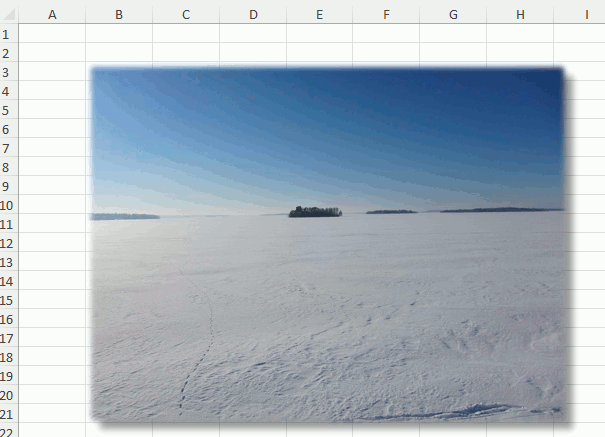
Adding a picture/image to the workbook will work in a very similar way as adding a Shape
//Add a jpg image and apply some effects (EPPlus 6+ interface).
var pic = worksheet.Drawings.AddPicture("Landscape", new FileInfo("c:\\temp\\LandscapeView.jpg"));
pic.SetPosition(2, 0, 1, 0);
pic.Effect.SetPresetShadow(ePresetExcelShadowType.OuterBottomRight);
pic.Effect.OuterShadow.Distance = 10;
pic.Effect.SetPresetSoftEdges(ePresetExcelSoftEdgesType.SoftEdge5Pt);
'Add a jpg image and apply some effects (EPPlus 6+ interface).
Dim pic = worksheet.Drawings.AddPicture("Landscape", New FileInfo("c:\temp\LandscapeView.jpg"))
pic.SetPosition(2, 0, 1, 0)
pic.Effect.SetPresetShadow(ePresetExcelShadowType.OuterBottomRight)
pic.Effect.OuterShadow.Distance = 10
pic.Effect.SetPresetSoftEdges(ePresetExcelSoftEdgesType.SoftEdge5Pt)
Read existing pictures
Re-arrange vertically
As with any other Drawing you can use the SendToBack and BringToFront methods to adjust how a Picture is located vertically compared with other Drawings.
Remove a Picture
You can remove a shape from a worksheet via the Drawings.Remove method.
The ExcelImage class
From EPPlus 6, the ExcelImage class replaces all System.Drawing.Common.Image properties (see list above).
Constructors
| Name | Description |
|---|---|
ExcelImage() |
Creates an ExcelImage to be used as template for adding images. Use the SetImage methods to load the image after initialization |
ExcelImage(string imagePath) |
Creates an ExcelImage and loads an image from file. |
ExcelImage(FileInfo imageFile) |
Creates an ExcelImage and loads an image from file. |
ExcelImage(Stream imageStream, ePictureType pictureType) |
Creates an ExcelImage from a stream. |
ExcelImage(byte[] imageBytes, ePictureType pictureType) |
Creates an ExcelImage from a byte array. |
| #### Properties | |
| These properties are all readonly. |
| Name | Data type | Description |
|---|---|---|
ImageBytes |
byte[] |
The image as a byte-array |
Type |
ePictureType |
The type of image, for example jpg, gif or svg |
Bounds |
ExcelImageInfo |
The bounds and resolution of the image |
Methods
| Name | Description |
|---|---|
SetImage(string) |
Sets the image from a file path |
SetImage(FileInfo) |
Sets the image from a FileInfo object |
SetImage(byte[], ePictureType) |
Sets the image from a byte array |
SetImage(Stream, ePictureType) |
Sets the image from a stream |
SetImage(ExcelImage) |
Sets the image from another image object |
SetImageAsync(string) |
Sets the image from a file path |
SetImageAsync(FileInfo) |
Sets the image from a FileInfo object |
SetImageAsync(Stream, ePictureType) |
Sets the image from a stream |
| ## See also | |
| Sample 5.1 (C#) or Sample 5.1 (VB) |