Conditional Formatting Specific Text Formulas
$\(\color{#ff4545}\textsf{\Large\{ⓘ}\kern{0.2cm}\normalsize Below only available from Epplus 7.0 onwards}\)$ |-----------------------------------------|
Specific Text Conditional Formattings now has the .Formula property instead of just .Text
Specific Text refers to the following Conditional Formatting types: - BeginsWith - EndsWith - ContainsText - NotContainsText
This feature represents the ability to enter a formula into the field with the IF formula in this image:
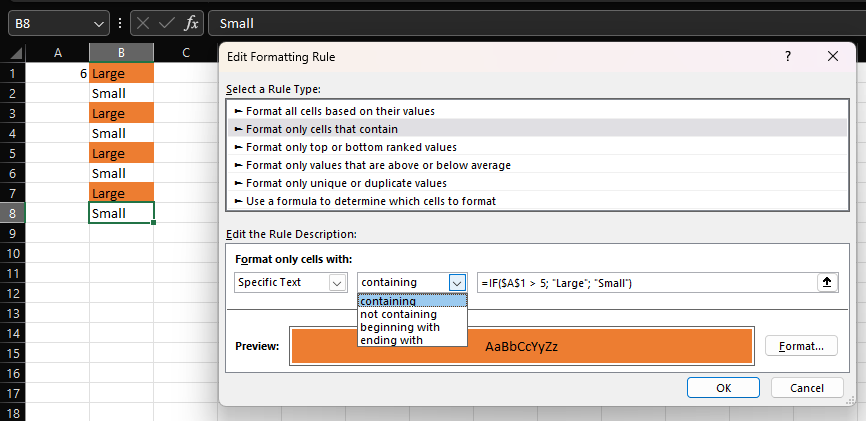
With this feature we can re-create this excel Conditional Formatting in epplus with this code:
 using (var pck = new ExcelPackage())
{
    var ws = pck.Workbook.Worksheets.Add("Sheet1");

    ws.Cells["A1"].Value = 6;

    for(int i = 1; i <= 8; i++)
    {
        ws.Cells[i, 2].Value = i % 2 == 0 ? "Small" : "Large";
    }

    var cf = ws.ConditionalFormatting.AddContainsText(new ExcelAddress("B1:B8"));

    cf.Formula = "IF($A$1 > 5, \"Large\", \"Small\")";

    cf.Style.Fill.PatternType = ExcelFillStyle.Solid;
    cf.Style.Fill.BackgroundColor.Theme = eThemeSchemeColor.Accent2;

    pck.SaveAs("C:\\temp\\TextFormula.xlsx");
}